Tuesday, 20 December 2016

Agile Dungeon

Our team was entering a period of bug sprints so it was an opportunity to have some fun with our usual sprint format. This time round the agile board was modelled as a Dungeons and Dragons dungeon, printed out to size needed to fit post-it notes on.

The team members created characters for themselves on post-it notes. The current task or bug being worked on was drawn as a 'monster' on the board.
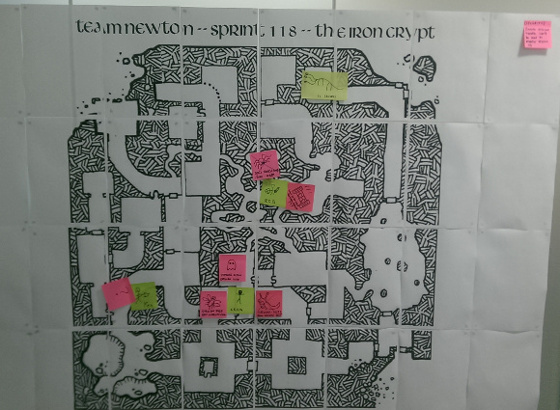
The agile board dungon generated using Dave's Mapper

This approach hopefully provides a strong tangible connection between what their characters were doing on the board and what they say during standup.

Retrospective

The following were planned as the activities for the retrospective.

A heroic tale

As a team, recount the events of the sprint and draw a quick and simple comic strip of the

team’s adventure using the characters and monsters from the dungeon.

Example:
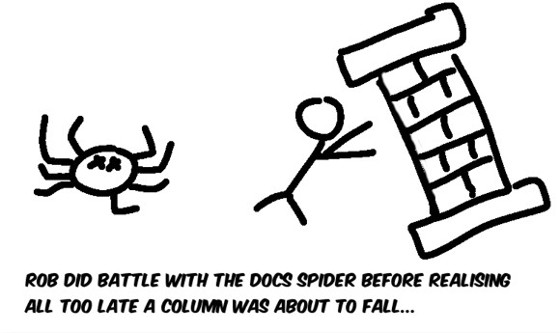
Take a photo of the comic for a team sprint poster

Retcon?

Retcon or ‘retroactive continuity’ is the process of changing a story after it has been written, rewriting the past.

Is there any part of the story you would write differently?

Create post-it notes for two columns “Repeat” and “Avoid”. Place each suggestion into the appropriate column and discuss how the team should respond to them.

Convert the actions into treasure chests (repeat) and traps and hazards (avoid) and place them on the dungeon; to claim if we achieve the change being suggested or if we fall into the same trap again.

Split the Party?

Decide how best to handle the performance testing (model as a Dragon?)

  • Should we concentrate the entire team for a short duration?
  • Should we dedicate one person full time to the task?

Discuss and decide on a course of action.

Level Up!

Ask each member of the team “what they would like to learn or achieve for next sprint?”

Thursday, 30 July 2015

Command Line Profiling

Profiling a Java application with VisualVM is easy enough to do, however if you're on a remote system which cannot accept a JMX connection then you will need to profile the application from the command line.

For this purpose I'm interested in profiling a running server application, rather than an application which is started and stopped.

There are a number of options:

hprof

This utility is provided with the JVM though appears to be somewhat out of date and has probably been superseded by other methods.

brendangregg.com provides a good article on how to use it and the problems with using it to diagnose performance problems. It does appear to have problems with the way it actually measures CPU usage.

Example profiling command:

java -agentlib:hprof=cpu=samples,depth=100,interval=20,lineno=y,thread=y mainClass

This will sample CPU usage up to 100 layers deep in stack traces every 20 ms. This will be dumped to the log file when the application terminates, or when it receives a SIGQUIT.

Example usage:

jps # to get Java Process pid

kill -3 && tail -f java.hprof.txt

Whilst appears useful, it seems somewhat clunky to get a meaningful output. Or perhaps needs more practice.

jstack

JStack is considerably simpler in that it just prints the stack trace for each thread, and then leaves it up to the caller to parse/analyse. This makes its operation simple to script up and allows precise control over when it should be used and the results it will collect.

A possibly useful parser might be ParseJStack which has a good writeup at weblogs.java.net.

Flight Recorder

With Java 8 comes flight recorder, which looks perhaps the most promising option of the lot.

Details: docs.oracle.com

Tuesday, 23 June 2015

5 Gallon Brewing Process

Some notes on the proposed 5 gallon brewing process for the office.

Local ingredients: Brew Bristol

Mash

  • Heat sparge water: 3.4 ml per gram of grain (e.g. 3.765kg grain = 12.8L)
  • Prepare grains in grain bag
  • Once at strike temperature 70C
  • Heat off
  • Add grain bag
  • Secure grain bag (string/bungee?), lid, cover with towel
  • Wait 1.5 hours

Sparge

Interestingly a cold water sparge should be ok.

  • Lift grain bag to agitate
  • Add cold water to make boil volume
  • Lift and drip drain grain bag

Boil

  • Start boiler
  • Wait 1.5 hours apx
  • Maintain rolling boil for boil time (1 hour typical)
  • Add hops at intervals

Cool

  • Setup buckets with cooling water (4 buckets = 2 cold supply, 2 on hot water drain)
  • Start cooling siphon before adding wort chiller to wort
  • Immerse wort chiller to wort
  • Maintain cooling water as required
  • Approximately 30 minutes to reach 30C

Ferment

  • Drain brew by dropping from height into fermentation bucket
  • Add yeast
  • Setup bung & airlock
  • Seal lid

That should be the complete process to get a brew started.

BruPacks Boiler Test

23rd June 2015

We needed to perform a test boil with the newly acquired boiler to find out the general timings of the boiler and test that it can actually perform the task we needed it to.

Image from Brupacks website

Our intention is to mash, sparge and boil in this boiler which will make it an excellent addition to the office brewing setup.

The timings collected from the test run were as follows:

  • 10:05 filling started
  • 10:13 filling complete, boil started
  • 11:24 close enough to full boil, cooling started
  • 12:06 cooling complete

That gives us approximately 1.5 hours to boil, 0.5 hours to cool which is quite a managable figure for a 5 gallon brew.

The cooling setup uses a copper immersion wort chiller

We found the siphon action between two brew buckets, refilling the cold supply and emptying the hot worked very nicely.

Tuesday, 19 May 2015

API/SDK Design Notes

Some excellent resources which detail API design:

A software development kit (SDK or "devkit") is typically a set of software development tools that allows the creation of applications for a certain software package, software framework, hardware platform, computer system, video game console, operating system, or similar development platform.

To create applications you have to download this software development kit. For example if you want to create an Android app you require a SDK with java programming, for iOS apps you require an iOS SDK with swift language, and to develop MS Windows apps you require the .net language.